Brush over watermarks, logos, or timestamps on any photo, image, or picture you own — AI erases them without blur and exports a clean PNG.
Free Daily Edit
Manual Brush Precision
No Added Watermark
Desktop, iPhone & Android
Step 1
Upload your photo
Upload a JPG, PNG, or WebP photo (up to 8 MB) and brush over the watermark, date stamp, or corner logo.
2 free credits/day (1 edit) after free sign-in · No credit card · No watermark
Before & after
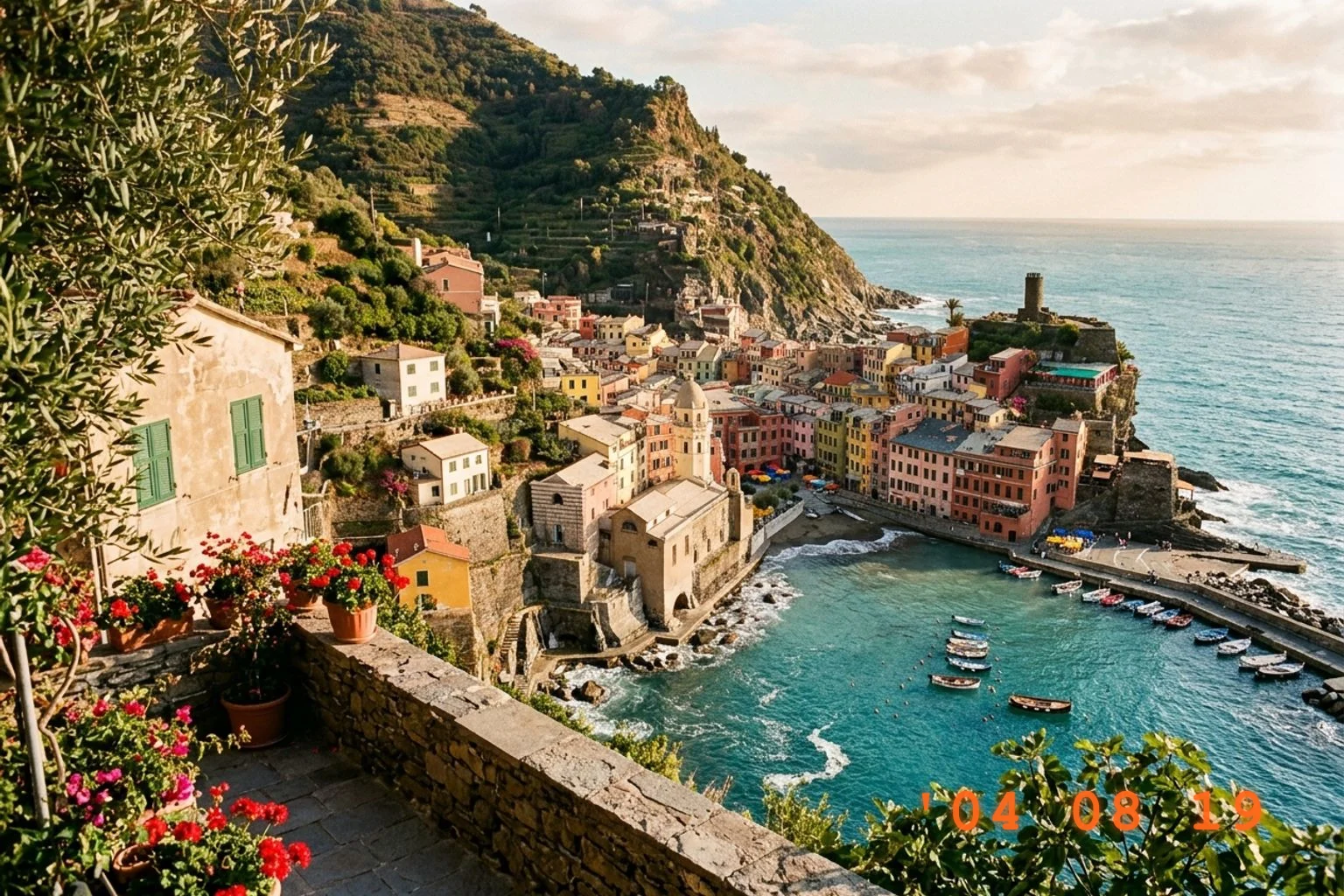
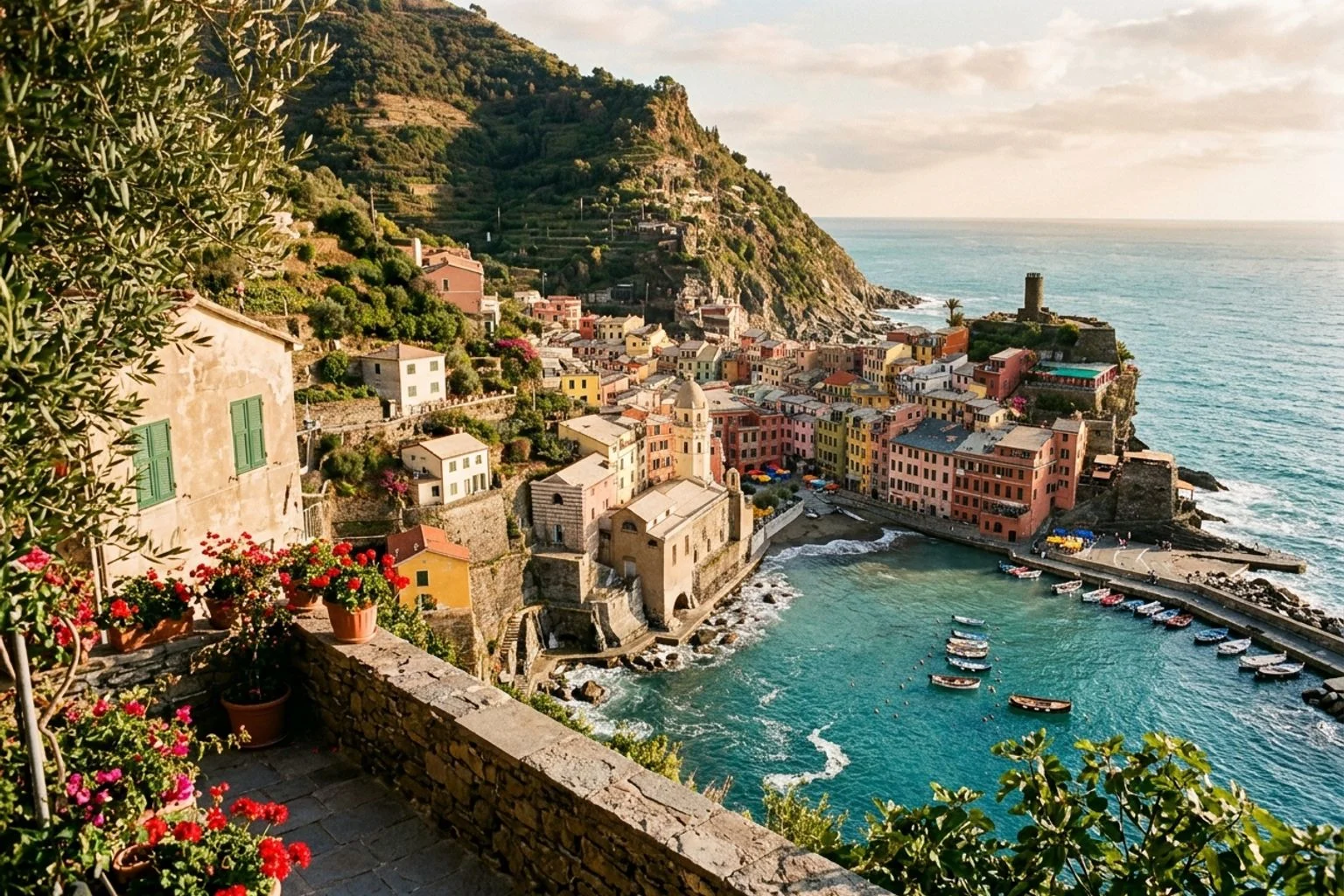
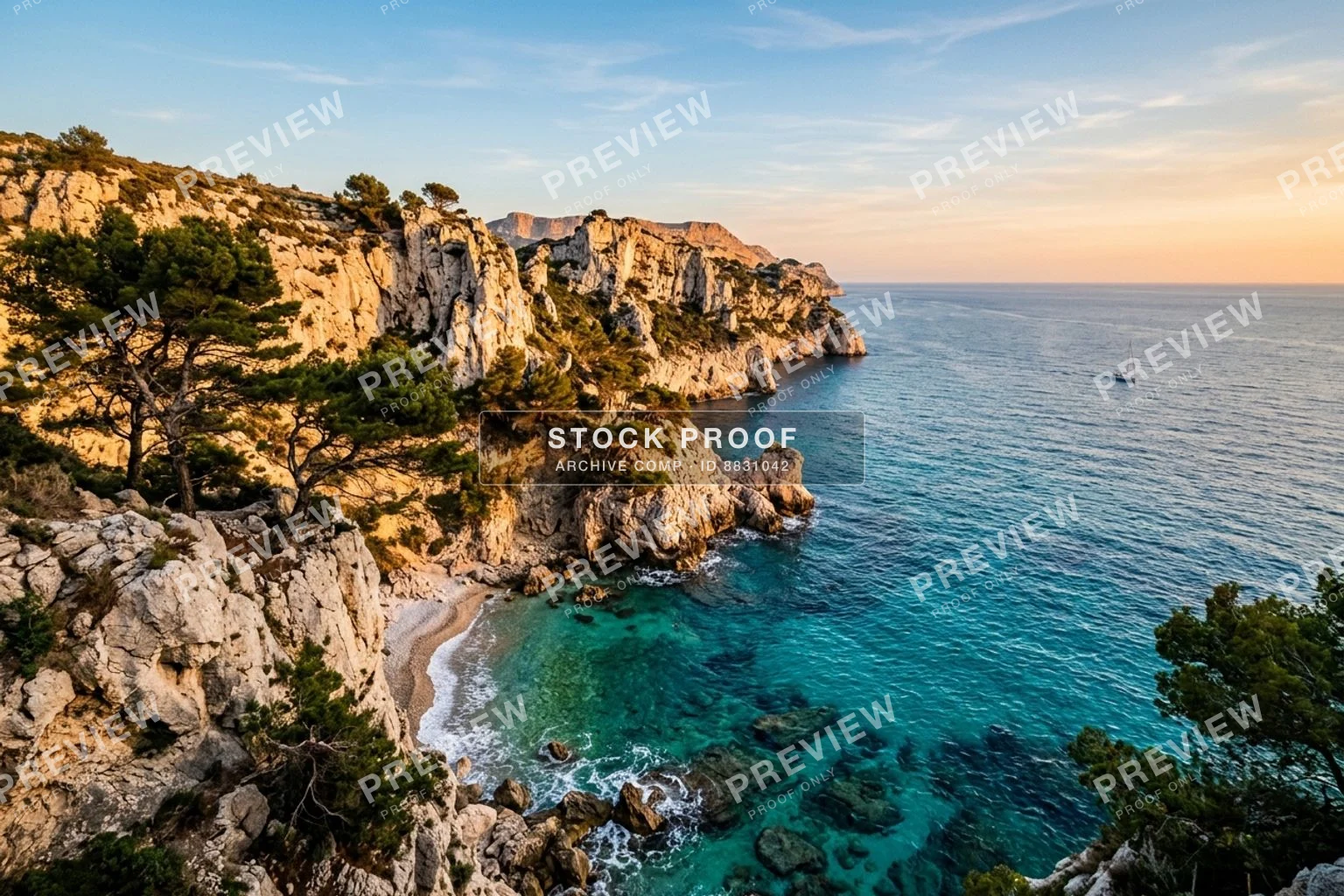
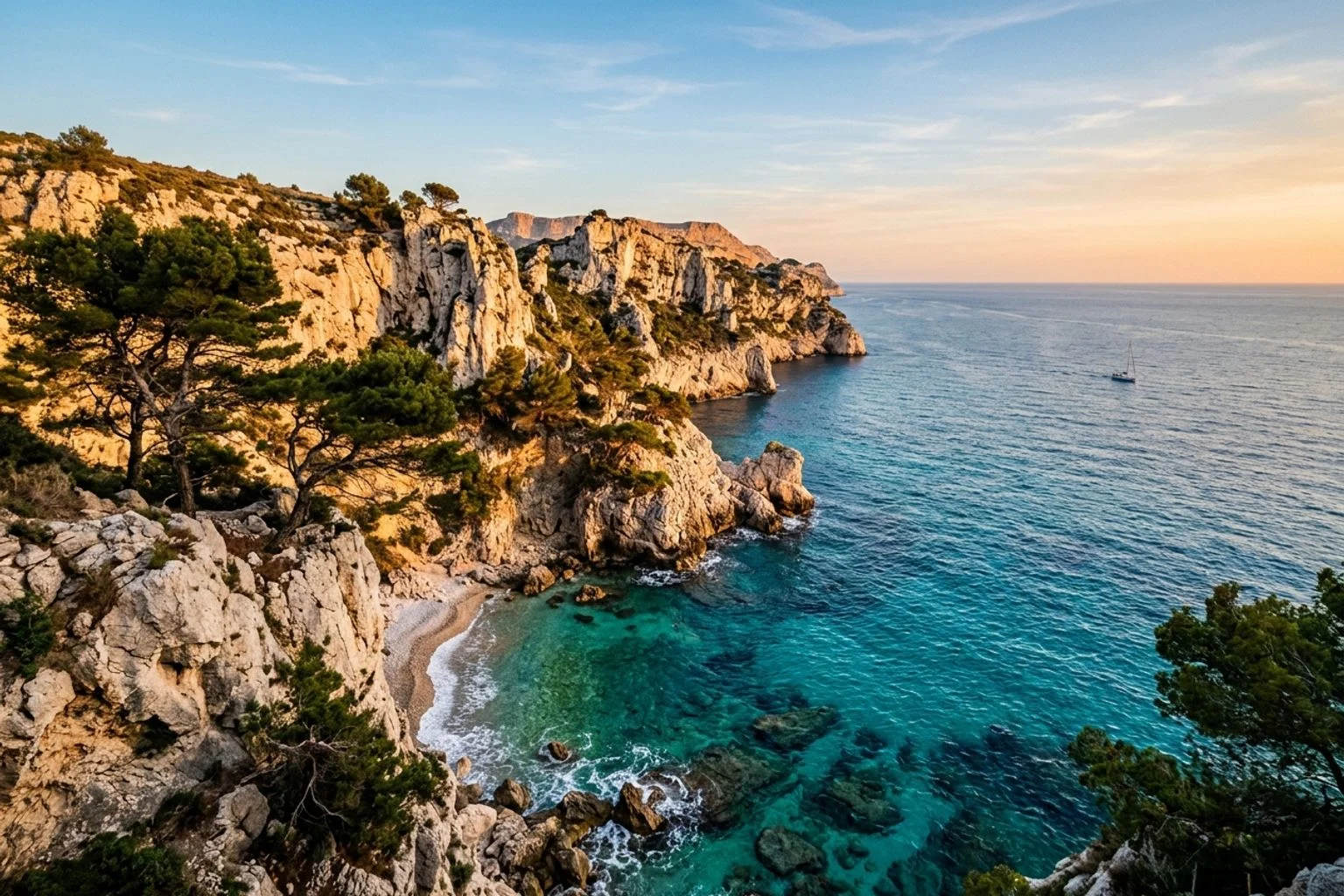
Before and after: watermarks removed from photos without blur
Drag each slider to inspect how localized brush masking clears diagonal overlays, camera date stamps, repeating tiled grids, and corner credit bars while keeping unmasked details sharp.
BeforeAfter
Camera timestamps & corner stamps
Clear phone camera date stamps, cloud tags, and corner marks cleanly
Turning off a camera watermark in Samsung, OnePlus, or Xiaomi settings only affects future shots — existing photos and cloud-service downloads still have dates or corner labels burned into the pixels. Painting over the corner restores foliage, sky, or water without cropping your photo.
Masked: bottom-right digital timestamp over leaves while keeping full original framing
Clean repeating tiled patterns across landscapes in focused passes
Dense repeating watermarks cross sky gradients, water ripples, and rocky textures at the same time. Working in 2–3 smaller brush passes gives localized inpainting clean neighboring texture to reference instead of turning the scene muddy.
Masked: repeating diagonal lines + center preview badge across sky and coastline
Erase diagonal sample banners without blurring fine food or product detail
Client proofs, draft mockups, and exported previews frequently carry a bold semi-transparent diagonal stamp straight across the main subject. Brushing smoothly over the letters lets localized AI reconstruct crust texture, highlights, and wood grain without smearing unmasked pixels.
Masked: diagonal SAMPLE lettering + 4–6 px outer glow margin in one pass
Remove corner credit strips and stamps while keeping faces untouched
Unlike whole-image AI chat tools that subtly alter eyes, skin tone, or expressions when asked to clean a photo, manual brush masking only edits the exact pixels you paint — leaving portraits, faces, and branding outside the mask 100% original.
Masked: lower-left credit bar + chest stamp (face and unmasked background untouched)
Magic Eraser Watermark Remover is a free AI watermark remover that lets you remove watermark online from photos, images, and pictures directly in your browser: upload a JPG, PNG, or WebP file (up to 8 MB), brush manually over the watermark with a 4–6 pixel margin, and click Erase. Localized AI inpainting rebuilds only the painted region in about 10–20 seconds and exports a high-quality, watermark-free PNG without losing quality. Signed-in accounts receive 2 free credits daily (1 free edit/day) with no credit card required, and temporary uploads auto-delete after 24 hours. Use only on images you own or have permission to edit.
Input
JPG, PNG, WebP (≤ 8 MB)
Export
High-quality PNG
Typical time
About 10–20 seconds
Free & privacy
1 edit/day · 24h cleanup
How to remove a watermark
How to remove watermark from photo in 3 steps
Whether you need to remove watermark from image files or remove watermark from picture downloads, it works straight in Chrome, Safari, Edge, or Firefox on Mac, Windows, iPhone, and Android — no install required.
Step 1
1. Upload your photo, image, or picture (JPG, PNG, or WebP)
Drop any static photo or picture up to 8 MB directly in Chrome, Safari, Edge, or Firefox on desktop, iPhone, or Android. No app download, desktop software, or browser extension is required.
Step 2
2. Brush manually over the watermark (+ 4–6 px margin)
Adjust the brush size to match the stamp, diagonal line, or corner logo, and paint roughly 4–6 pixels beyond semi-transparent edges so no faint halo or ghost outline stays behind.
Step 3
3. Erase and download a watermark-free PNG
Click Erase and wait about 10–20 seconds. Localized AI fills only the masked strokes while leaving unmasked faces, text, and details unchanged, then exports a clean PNG with no added watermark.
Under the hood
How AI watermark removers work — and why manual brush control matters
Understanding how localized inpainting differs from auto-only removers and chatbots explains how to remove watermarks from an image cleanly without leaving a blurry patch.
01
Manual brush masking protects everything you want to keep
Fully automatic watermark removers guess which marks to erase — and frequently wipe out real product labels, store signs, or your own brand logo by mistake. Painting the exact mask as a manual watermark remover gives you pixel-level control over what changes.
02
Localized AI inpainting rebuilds texture without blur
Instead of smearing nearby pixels like a basic blur tool or re-generating the whole picture like an AI chatbot, localized inpainting analyzes surrounding edges, lighting, and grain to synthesize matching background pixels strictly inside the brushed mask.
03
Unmasked pixels and original framing stay intact
Everything outside your brush stroke passes through untouched. Your photo keeps its original aspect ratio, avoids forced 1MP downscaling on free edits, and exports as a clean PNG without stamping a new tool watermark onto the result.
Supported watermark types
Watermarks this image watermark remover cleans — and honest limits
Six everyday watermark categories across personal photos, phone cameras, cloud downloads, AI generators, and social saves.
Translucent diagonal wordmarks, centered proof bars, and draft overlays stamped across your own client mockups, portfolio drafts, or licensed images.
Limit: Cleanest in one continuous brush stroke across flat skies, walls, wood, or fabrics; if a thick bar covers small eyes or tiny text, expect slight softness.
Small corner logos, cloud gallery attribution badges, broadcaster bugs, and handwritten or typed artist signatures on photos you own or exported from an online editor.
Limit: Brush 4–6 px wider than drop shadows or frosted boxes. For product emblems and clothing logos, our dedicated Logo Remover covers extra tips.
Grid-style repeating text or icons distributed across an entire draft picture or contact sheet.
Limit: Do not paint more than ~30% of the photo in a single pass. Clearing tiled watermarks in 2–3 smaller passes keeps textures sharp instead of blurry.
Phone camera timestamps & Samsung Galaxy AI marks
Date/time stamps, "Shot on OnePlus / Xiaomi / Redmi" bars, Samsung S24 Ultra camera watermarks, and Samsung Galaxy AI sparkle badges on existing photos.
Limit: Phone camera settings only disable watermarks on future photos — use brush inpainting to clean photos already saved in your gallery.
AI-generated image badges (Gemini, Nano Banana, Dola, Meta AI)
Visible bottom-corner four-point sparkle marks and generator corner badges on AI-created visuals from Google Gemini, Nano Banana, Dola AI, GPT Image, or Meta AI.
Limit: Erasing a visible corner mark only edits corner pixels and does NOT remove invisible metadata such as Google SynthID or C2PA provenance.
Username stamps on TikTok photo carousels/slideshows, Reddit saved-image attribution footers, and static frames exported from iPhone Live Photos.
Limit: Processes static images only (JPG, PNG, WebP up to 8 MB) — does not edit MP4 videos, TikTok video clips, or animated GIFs.
How it compares
Magic Eraser vs. top watermark removers & Photoshop
Compare Magic Eraser with WatermarkRemover.io, DeWatermark, Phototune, MagicRemover, Photoshop, and built-in OS tools on brush control, export resolution, and free credits.
Auto-only web tools (WatermarkRemover.io, Phototune, Pixelbin)
One-click detectors are fast on standard stock grids, but they give you no brush control — meaning they can miss corner stamps, leave translucent halos, or accidentally erase real text and signs in your photo.
Low-resolution free erasers (MagicRemover.org)
Some browser tools offer manual brushing without login, but cap free exports at roughly 1 megapixel (~1155×866 px). Magic Eraser exports a high-quality PNG preserving your original aspect ratio with no added watermark.
Desktop suites (Photoshop, GIMP) & Windows 11 Paint
Photoshop Remove Tool and Generative Fill are powerful for heavy retouching, but require a paid subscription and desktop install. Windows 11 Paint Generative Fill is free locally, but only runs on Windows 11 — not Mac, iPhone, or Android.
AI chatbots (ChatGPT) & phone editors (Apple Clean Up / Canva)
ChatGPT often refuses watermark edits or re-renders the entire photo, shifting faces and colors. Apple Clean Up requires iOS 18.1+ on iPhone 15 Pro or newer, and Canva Magic Eraser requires a paid Canva Pro plan.
Side-by-side feature comparison
Swipe horizontally to compare
Tool / Method
Control mode
Free allowance
Output quality & limits
Platforms
Paid entry
Magic Eraser Watermark Remover
This tool (erasermagiceraser.com)
Manual brush + localized AI
2 credits/day (1 edit/day, free sign-in)
High-quality PNG, no output watermark
Any browser (Web, iPhone, Android, Mac, Win)
$9.99/mo or $14.99 pack (never expires)
WatermarkRemover.io / Pixelbin
Auto-detection web tools
Auto-detect only (no manual brush)
2–3 free images
High-res, but auto mode can miss corner stamps
Web + mobile app
From ~$8.99 / 30 credits or $15/mo
DeWatermark.ai
AI watermark remover
Auto-detect + manual brush
Limited free previews / daily credits
Strong quality; supports batch on paid tiers
Web browser
From ~$7 / 100 credits
Phototune.ai / DrWatermark
Auto-cleanup web tools
Automatic AI detection
Free browser tries / 3 daily credits
Up to 10 MB; less control on selective marks
Web browser
Credit / subscription tiers
MagicRemover.org
Browser brush remover
Manual brush + AI inpainting
2 images/day without sign-in
Free output downscaled to ~1 MP (~1155×866)
Web browser
Paid upgrade for higher resolution
Adobe Photoshop / Canva Pro
Paid design suites
Full manual layers + Generative Fill
Free trial only (Magic Eraser needs Canva Pro)
Full native resolution
Desktop (Photoshop) / Web & app (Canva)
$15/mo (Canva Pro) or $22.99+/mo (Photoshop)
Win 11 Paint / ChatGPT
Built-in OS & AI chat tools
Lasso fill (Paint) / text prompt (ChatGPT)
Free on Win 11 / ChatGPT free tier limits
ChatGPT re-renders & alters faces; Paint is Win 11 only
Windows 11 only (Paint) / Web & app (ChatGPT)
Free (Win 11) / $20/mo (ChatGPT Plus)
Better results
4 tips to remove watermarks without blur or faint ghosts
A slight margin past semi-transparent edges and focused passes on tiled patterns make the difference between a faint smudge and a natural rebuild.
Brush 4–6 pixels past semi-transparent watermark edges
Prevents faint ghosts
Translucent white letters, corner logos, and sparkle marks have soft feathered edges. Painting slightly wider than the visible text prevents a faint ghost outline or semi-transparent halo from showing up after export.
02
Clear repeating tiled watermarks in 2–3 smaller passes
No blur
Masking more than ~30% of the frame at once forces the AI to guess large areas of texture. Erase one cluster of diagonal marks, inspect the result, then clean the remaining marks on a second pass for crisp detail.
03
Upload the original photo instead of a re-compressed screenshot
Sharpest output
Screenshots and messaging-app forwards add heavy JPEG blocking around high-contrast text. Uploading the original JPG, PNG, or WebP file (up to 8 MB) gives the inpainting model cleaner surrounding grain to match.
04
Zoom in tight around faces, logos, and fine typography
Manual precision
Use a small brush whenever a watermark sits close to eyes, hair strands, or product text you want to keep. Because unmasked pixels stay 100% untouched, tight strokes keep delicate features sharp.
Honest expectations
Who this photo watermark remover is for — and what it does not do
Good fit for
Photos and artwork you own — cleaning old portfolio drafts, lost clean masters, or photos downloaded from a cloud gallery that added a corner tag.
Phone camera & AI-generator corner marks — removing Samsung/OnePlus/Xiaomi camera date stamps, Samsung Galaxy AI icons, and visible Gemini or Nano Banana sparkle marks on images you created.
Licensed or client-approved assets — clearing draft proof banners or placeholder stamps once you hold written permission or a valid license for the image.
Fast browser cleanup without desktop software — works in Safari, Chrome, Edge, and Firefox across Mac, Windows, iPhone, and Android with no Photoshop overkill and no added output watermark.
Not the right fit for
Unlicensed stock photos or photographer proofs — stripping watermarks from Alamy, Getty Images, Shutterstock, Adobe Stock, iStock, GradImages, or Disney PhotoPass previews without buying a license violates copyright law.
Videos, GIFs, or moving watermarks — Magic Eraser edits static images only (JPG, PNG, WebP up to 8 MB). It cannot remove watermarks from Sora, Veo 3, CapCut, TikTok MP4 videos, or animated GIFs.
PDFs, Word documents, or invisible AI text watermarks — does not edit native PDF/DOCX/Excel files directly (screenshot or export the page as PNG first) and does not strip invisible SynthID metadata or ChatGPT text characters.
Bulk / batch folders or heavy >30% full-frame occlusion — edits one photo at a time for manual accuracy; if a dense solid stamp completely obscures a person’s face, AI reconstructs plausible pixels rather than recovering hidden originals.
Copyright & legal guidance
Is it legal to remove a watermark from a photo?
The legality of removing watermarks depends on image ownership and permission, not on whether you use AI or Photoshop. Under US copyright law (17 U.S.C. § 1202), removing Copyright Management Information (CMI) without authority to conceal infringement is prohibited.
Generally allowed
Your own photos, drafts & personal camera stamps
Removing watermarks you placed yourself, phone camera timestamps, cloud-service corner stamps on your own uploads, or visible corner badges on images you generated (while still following platform AI disclosure rules).
Check license terms
Purchased stock images & client proof approvals
If you already paid for a license or hold written permission from the photographer, always download the clean master file from the agency or photographer first. Only clean a watermarked copy when authorized and the clean master is unavailable.
Not allowed (17 U.S.C. § 1202)
Unlicensed stock agency & photographer watermarks
Under US copyright law (17 U.S.C. § 1202), intentionally removing Copyright Management Information (CMI) such as a photographer’s name or stock agency watermark to conceal infringement is illegal — AI tools do not transfer copyright rights.
Limits, pricing, and privacy
Free every day
Every signed-in account receives 2 free credits per day (= 1 photo edit per day), with no credit card required and no added watermark on your PNG download.
Pay-as-you-go or monthly
One-time Credit Packs start at $14.99 for 200 credits (100 edits) and never expire. Monthly plans start at $9.99/month for 200 credits. View pricing
Privacy & file retention
Accepts JPG, PNG, and WebP up to 8 MB. Files upload only when you click Erase, are never published publicly, and auto-delete after 24 hours. See our Privacy Policy and Terms of Service.
FAQ
Frequently asked questions about removing watermarks from photos
How do I remove watermarks from photos for free online?
Upload your JPG, PNG, or WebP photo (up to 8 MB) to Magic Eraser Watermark Remover, paint over the watermark with a 4–6 pixel margin, and click Erase. Signed-in users receive 2 free credits daily (1 free edit per day) with no credit card required and download a clean PNG in about 10–20 seconds.
2
Will removing a watermark reduce my photo's quality or add a new watermark?
No. Unmasked pixels pass through untouched, so you can remove watermarks without losing quality — your photo preserves its original aspect ratio and exports as a high-quality PNG instead of being downscaled to ~1 MP. Magic Eraser never stamps its own logo or watermark onto your download, whether you use free daily credits or a paid pack.
3
How do watermark removers work without blurring the photo?
Modern AI watermark removers use localized inpainting rather than simple blur or clone stamps. Once you brush over the watermark, the model reads surrounding textures, edges, and lighting outside the mask and generates matching pixels strictly inside the painted area — leaving the rest of the image sharp and untouched.
4
Does Magic Eraser work as a manual watermark remover without erasing my own logo?
Yes. Unlike auto-detect tools that decide on their own which text or stamps to delete, Magic Eraser is a manual brush watermark remover: you choose the exact area to paint, so your own product branding, captions, and surrounding details stay completely intact.
5
How do I remove a watermark from a photo on iPhone or Samsung?
Magic Eraser runs directly in Safari on iPhone and Chrome on Samsung/Android with no app install. You can also try Apple Clean Up in iOS 18.1+ (requires iPhone 15 Pro or newer) or Samsung Gallery Object Eraser on supported Galaxy phones — and note that turning off Samsung S24 Ultra or camera watermarks in Settings only applies to future photos.
6
Can ChatGPT or AI remove watermarks from photos?
Dedicated AI inpainting tools like Magic Eraser are built to clean visible watermarks from images you own. General chatbots like ChatGPT frequently refuse watermark edits due to safety policies, and when they do edit a photo they typically re-render the entire frame, subtly changing faces, text, or colors.
7
Why does a faint ghost or halo remain after removing a semi-transparent watermark?
Semi-transparent watermarks and corner logos have soft antialiased edges or drop shadows that extend beyond the brightest letters. If you paint too tightly, those edge pixels remain as a faint outline. Brush 4–6 pixels wider than the watermark — or run a quick second small pass over any leftover halo — for a clean blend.
8
Can I remove TikTok downloaded photo, Reddit, or Gemini AI watermarks?
Yes, for static images. Brush over the username stamp on a TikTok downloaded photo (carousel/slideshow still), a Reddit saved-image attribution bar (which you can also disable for future saves in Reddit Settings), or a visible Gemini, Nano Banana, or Samsung Galaxy AI corner sparkle. Note that erasing a visible AI corner mark does not remove invisible SynthID metadata — see our dedicated Gemini Watermark Remover tool below for full details.
9
Can I remove watermarks from videos, GIFs, PDFs, or in bulk here?
Magic Eraser currently edits one static image at a time (JPG, PNG, or WebP up to 8 MB) for manual accuracy, so it does not process MP4 videos (such as Sora, CapCut, or TikTok video clips), animated GIFs, bulk folders, or native PDF/Word files. For a single PDF or slide graphic, export or screenshot that page as a PNG first and clean it here.
10
Is it legal to remove watermarks from photos, and are my uploads private?
Removing a watermark from your own photo, a camera date stamp, or an image you have permission to edit is legal, whereas stripping copyright watermarks from unlicensed stock photos or photographer proofs can violate US law under 17 U.S.C. § 1202. Uploads are never published publicly and are scheduled for automatic deletion after 24 hours.